
Partitioned Databases - Sizing
Choosing a partition key for a partitioned Cloudant databases is about selecting an attribute that has:
- Many values - lots of small partitions are better than a few large ones.
- No hot spots - avoid designing a system that makes one partition handle a high proportion of the workload. If the work is evenly distributed around the partitions, the database will perform more smoothly.
- Repeating - If each partition key is unique, there will be one document per partition. To get the best out of partitioned databases, there should be multiple documents per partition - documents that logically belong together.
We don’t want a single partition to get too big (bigger than a handful of GB) or to have to handle a disproportionate amount of the database’s workload.
Although there are no API calls that can deliver a league table of the largest partitions in your database, it’s simple enough to generate a MapReduce view to estimate the size of each partition. Here’s how.
Creating a MapReduce view to estimate partition size
MapReduce views are defined as JavaScript functions that are executed for each document in the database. We want to extract the partition key from each document’s _id field and use that as the view’s key.
function (doc) {
  // extract the document _id's partition key
  var id = doc._id
  var partition_key = id.slice(0, id.indexOf(':'))

  // calculate size of document
  var docsize = JSON.stringify(doc).length

  // create view where the key is the partition_key and the value is the document size
  emit(partition_key, docsize);
}
The view can be defined by pasting the JavaScript into the Cloudant dashboard (Design Documents + New View):
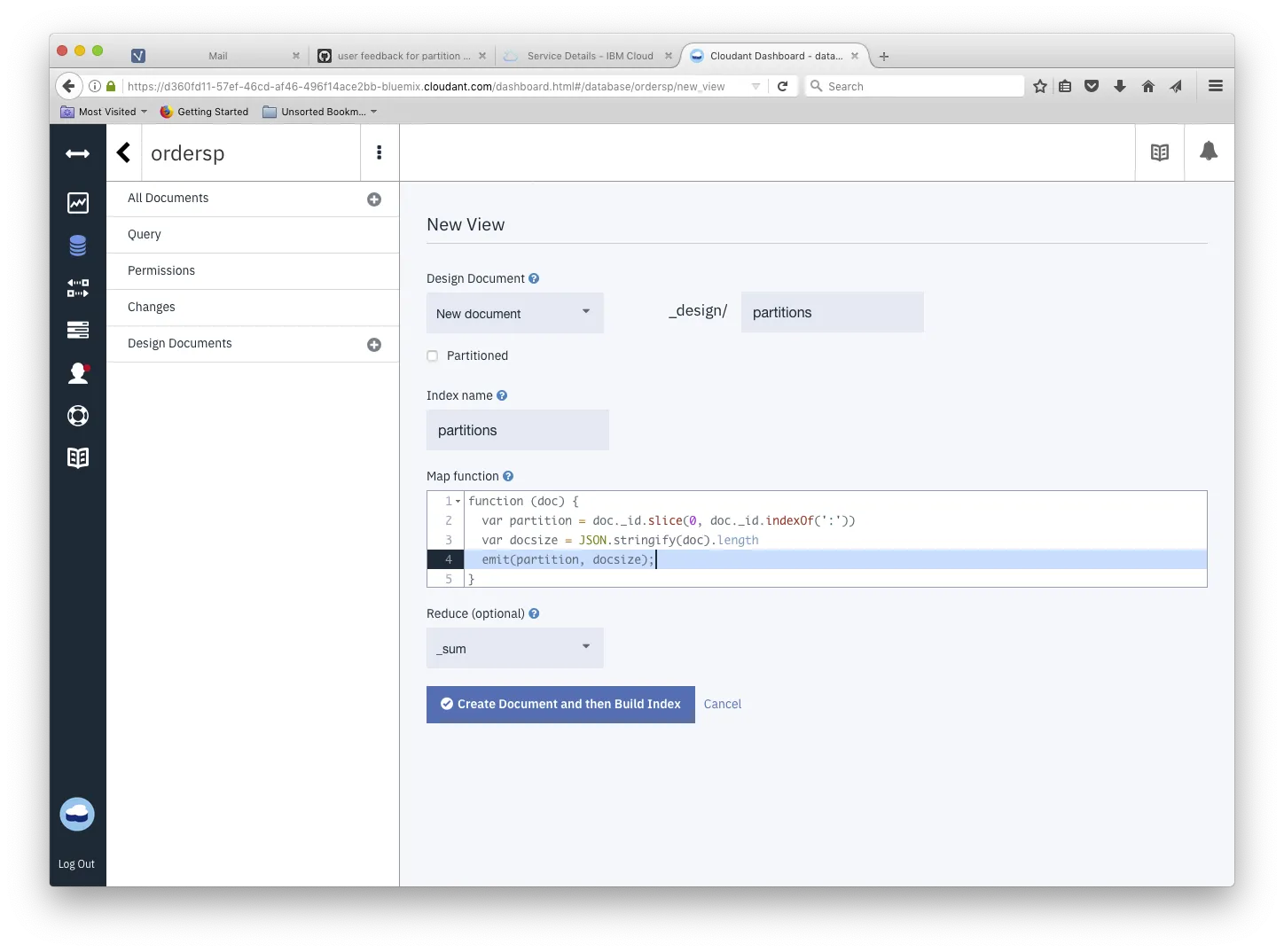
If we choose the _sum reducer, we get the sum of the document sizes by partition (not including conflicts or attachments) - if we choose the _count reducer we get the number of documents per partition.
Querying the view
The MapReduce view can be queried with group_level=1 to generate totals/counts by the view’s key (the partition key):
curl '$URL/$DB/_design/partitions/_view/partitions?group_level=1'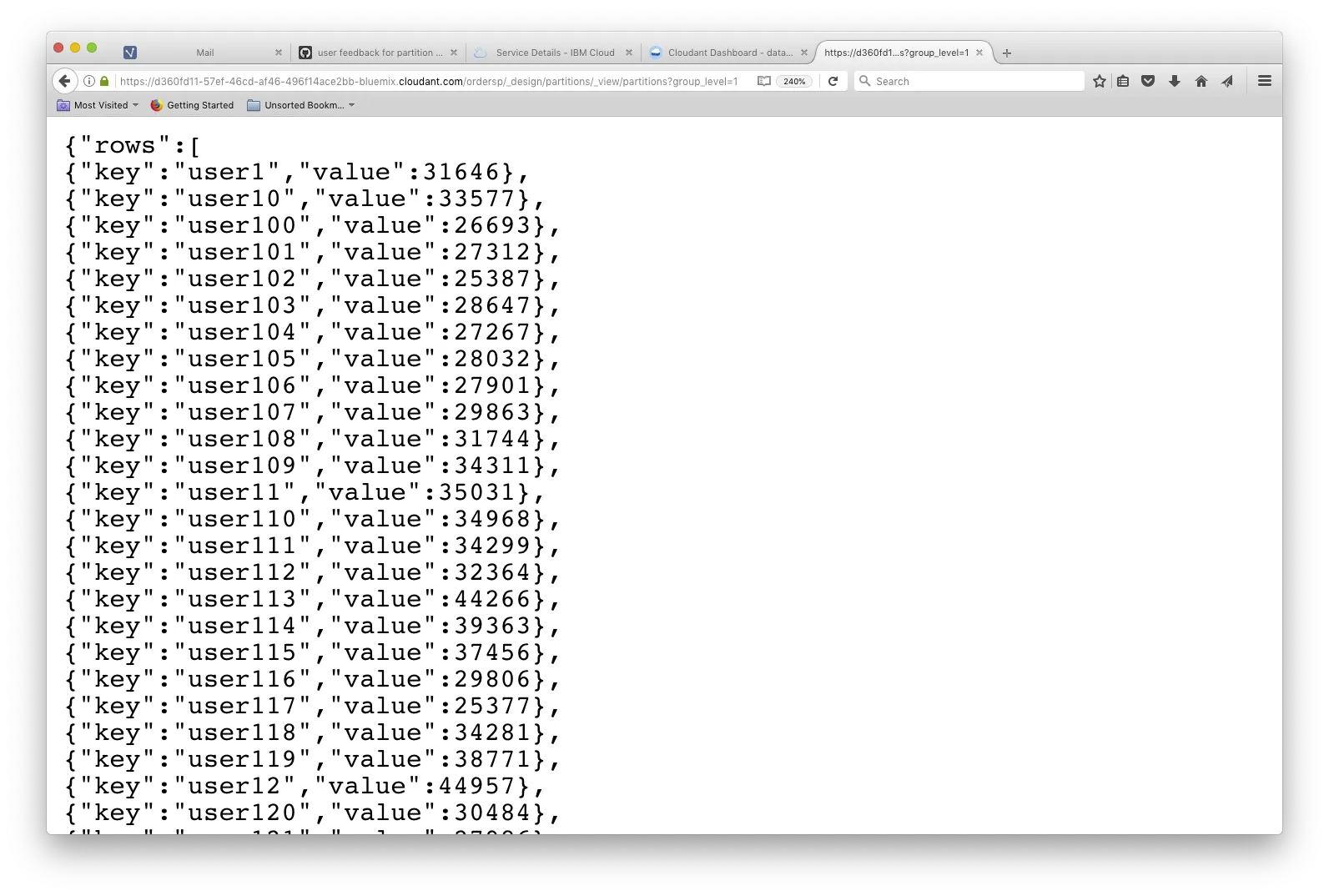
To sort the data set we can pipe this data into jq and sort the array by value (to get the biggest or fullest partitions last in the list):
curl '$URL/$DB/_design/partitions/_view/partitions?group_level=1'| jq '.rows | sort_by(.value)'
[
  {
    "key": "user649",
    "value": 18370
  },
  {
    "key": "user278",
    "value": 18977
  },
  {
    "key": "user245",
    "value": 19048
  },
  ...
  {
    "key": "user489",
    "value": 45121
  },
  {
    "key": "user755",
    "value": 46365
  },
  {
    "key": "user970",
    "value": 46513
  }
]
Top ten partition count
To produce a “top ten” list of partitions by document count, we’re going to need a custom “reduce” function.
Map
Our map function simply emits a value of “1” for each document against a key of the document’s partition key:
function (doc) {
  var partition = doc._id.slice(0, doc._id.indexOf(':'))
  emit(partition, 1);
}
Reduce
The custom reducer (written by Adam Kocoloski) pushes responsibility for the secondary aggregation of the list of partition document counts to the database by employing a second “reduction” phase. This is neat in terms of the form of the returned data but custom-reducers are difficult to write, debug and maintain and are not to be recommended for general use in Cloudant as they lead to poor database performance.
function (keys, values, rereduce) {
  var topTenPlusBoundaryKeys = function(partitions) {
    // preserve boundary keys because we may not have the correct count for them yet
    // not that it matters, but the array is reversed so these labels are correct
    var first = partitions.pop();
    var last = partitions.shift();

    // sort the remaining entries by value
    partitions.sort(function(p1, p2) { return p2.count - p1.count; });

    // return the top ten partitions, plus the boundary partitions, all sorted
    var topTen = partitions.slice(0, 10);
    if(first) { topTen.push(first) };
    if(last) { topTen.push(last) };
    topTen.sort(function(p1, p2) { return p2.count - p1.count; });
    return topTen;
  };

  if (rereduce) {
    // account for boundary keys by summing over each partition
    var totals = values.reduce(function(acc, currentVals) {
      currentVals.forEach(function(elem) {
        if(acc[elem.partition]) {
          acc[elem.partition] += elem.count;
        } else {
          acc[elem.partition] = elem.count;
        }
      });
      return acc;
    }, {});

    // convert back into an Array with expected structure
    var reduced = [];
    for (var elem in totals) {
      reduced.push({partition: elem, count: totals[elem]})
    };
    // sort in reverse order just to stay consistent with rereduce=false
    // again, all that's required is to find the boundary keys
    reduced.sort(function(p1, p2) {
      if(p2.partition < p1.partition) {
        return -1;
      }
      if(p1.partition < p2.partition) {
        return 1;
      }
      return 0;
    });

    return topTenPlusBoundaryKeys(reduced);
  }
  else {
    // compute the number of index entries per partition
    var reduced = keys.reduce(function(output, currentKey, index) {
      if(currentKey[0] == output[0].partition) {
        output[0].count += values[index]
      }
      else {
        output.unshift({partition: currentKey[0], count: values[index]})
      }
      return output;
    }, [{partition: keys[0][0], count: 0}]);

    return topTenPlusBoundaryKeys(reduced);
  }
}
Querying the top-ten view
Query the view without any parameters produces a list of the partitions with the most documents.
curl '$URL/$DB/_design/partitions/_view/topten'
{"rows":[
{"key":null,"value":[
{"partition":"user970","count":73},
{"partition":"user755","count":73},
{"partition":"user489","count":71},
{"partition":"user396","count":71},
{"partition":"user12","count":71},
{"partition":"user816","count":70},
{"partition":"user113","count":70},
{"partition":"user9","count":69},
{"partition":"user815","count":69},
{"partition":"user662","count":69},
{"partition":"user1","count":50},
{"partition":"user999","count":44}]}
]}